Website audit checklist: your complete 2026 guide

A website audit checklist is a systematic evaluation framework that assesses your site’s technical SEO, content quality, backlink profile, user experience, and conversion capability in one structured process. Most businesses should run a full audit quarterly to stay competitive and catch issues before they compound. A thorough site health assessment covers far more than broken links or slow pages. It maps every factor that affects how search engines rank your site and how visitors behave once they arrive. This guide gives you a practical, phased framework to run that process confidently, whether you are a business owner managing your own site or a marketing professional responsible for a client’s performance.
What are the key components of an effective website audit checklist?
A professional website audit checklist follows a four-phase framework: Technical SEO, Content Quality, Backlink Profile, and User Experience with Conversion Analysis. Following a phased framework improves resolution effectiveness and separates amateur audits from professional ones. Each phase builds on the last, so skipping ahead creates blind spots.
Technical SEO
Technical checks form the foundation of any site performance checklist. Without a clean technical base, content and backlink improvements deliver far less value.
Key technical items to verify:
- Sitemap validation: Confirm your XML sitemap is submitted to Google Search Console and reflects your current page structure.
- Crawl errors: Identify 404 errors, server errors, and blocked resources that prevent search engines from indexing your pages.
- Canonical tags: Check that duplicate or near-duplicate pages point to the correct canonical URL to avoid diluting ranking signals.
- Page speed and Core Web Vitals: Measure Largest Contentful Paint, Cumulative Layout Shift, and Interaction to Next Paint using Google’s PageSpeed Insights.
- Mobile-friendliness: Confirm your site passes Google’s mobile usability tests, as mobile indexing is now the default.
- Robots.txt configuration: A single misconfigured robots.txt file can block entire site sections from being crawled, nullifying other SEO work.
Content quality
Your on-page SEO checklist should cover keyword targeting accuracy, duplicate or thin content, meta tag completeness, and heading structure. Check that each page targets a distinct primary keyword and that title tags and meta descriptions are unique, within character limits, and written to attract clicks. Thin content, defined as pages with little substantive information, weakens your overall domain authority.

Backlink profile
Review your backlink profile for toxic links that could trigger a Google penalty, and assess the overall authority and diversity of referring domains. A gap analysis comparing your profile against well-ranking competitors reveals link-building opportunities your site is missing.
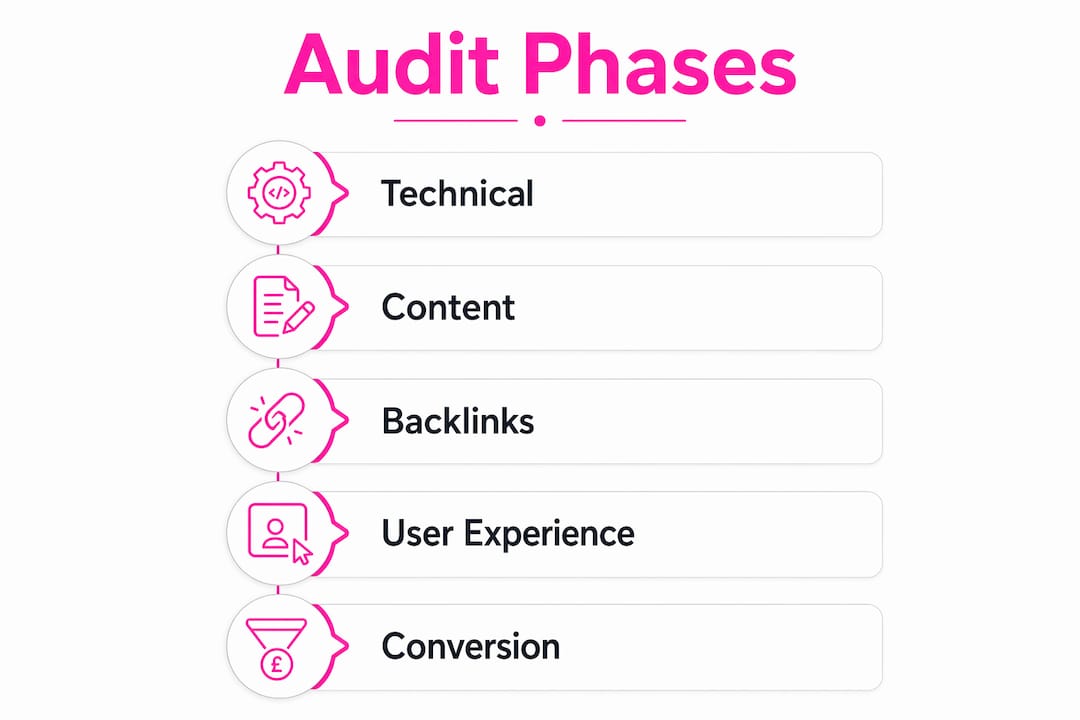
User experience and conversion analysis
Conversion analysis is the most overlooked audit category despite being critical to turning visits into paying customers. Assess navigation clarity, call-to-action placement, form complexity, and page layout to identify where visitors drop off before converting.
| Audit category | Key checklist items |
|---|---|
| Technical SEO | Crawl errors, sitemap, canonical tags, Core Web Vitals, robots.txt |
| Content quality | Keyword targeting, meta tags, heading structure, duplicate content |
| Backlink profile | Toxic links, domain authority, referring domain diversity |
| UX and conversions | Navigation, CTA placement, form friction, page layout |
Pro Tip: Run your technical audit before touching content or backlinks. Fixing crawl errors first means your subsequent improvements actually get indexed.
How to prepare for and conduct a website audit efficiently
Preparation determines whether your audit produces a clear action plan or a confusing list of disconnected findings. The right setup takes less than an hour and makes the analysis phase far more productive.
Establish performance baselines
Record your current organic traffic, indexed page count, and keyword rankings before making any changes. Baselines from GA4, Google Search Console, and a keyword tracking tool are the only way to measure whether your fixes actually worked. Without them, you are comparing two unknowns.
Secure the right access
You do not need full administrative access to run a thorough audit. Read-only access to analytics and webmaster platforms maintains security while giving analysts everything they need. This is particularly relevant when an external agency or consultant is running the audit on your behalf.
Follow a structured workflow
- Grant read-only access to GA4, Google Search Console, and your CMS for all analysts involved.
- Run a full site crawl using a web crawler to map all URLs, identify errors, and flag redirect chains.
- Export keyword rankings from a rank tracking tool to identify pages losing visibility.
- Audit technical issues first, working through crawl errors, page speed, and mobile usability before moving to content.
- Review content quality page by page, checking meta tags, keyword targeting, and heading structure.
- Analyse the backlink profile using a link analysis tool, flagging toxic links for disavowal.
- Assess UX and conversions, reviewing heatmaps, session recordings, and funnel drop-off data.
- Compile findings into a prioritised report, grouping fixes by impact and effort.
A professional-grade audit typically requires 8–12 hours of specialist time, with results ready within 48 hours of access being granted. Allocating that time across two focused working days prevents fatigue from skewing your judgement.
Pro Tip: Block your audit time in your marketing calendar as a fixed quarterly commitment. Treat it like a board meeting. It will not happen consistently if it competes with reactive tasks.
What are common issues uncovered by website audits and how to prioritise fixes?
SEO audits typically uncover between 15 and 150 critical site errors depending on site scale and history. That range is wide, but the types of issues are predictable. Most sites cluster around the same recurring problems.
The ten most common findings across business websites:
- Crawl errors: 404 pages and broken internal links that waste crawl budget and frustrate visitors.
- Redirect chains: Multiple sequential redirects that slow page load and dilute link equity.
- Robots.txt misconfigurations: Accidentally blocked pages or sections that should be indexed.
- Missing or duplicate meta descriptions: Pages with no meta description or identical descriptions across multiple URLs.
- Thin content: Pages with fewer than 300 words that offer little value to visitors or search engines.
- Weak keyword targeting: Pages optimised for the wrong terms or targeting keywords with no realistic ranking potential.
- Toxic backlinks: Links from low-quality or spammy domains that put your site at risk of a manual penalty.
- Poor CTA placement: Conversion actions buried below the fold or absent from key landing pages.
- Complicated forms: Checkout or contact forms with unnecessary fields that increase abandonment rates.
- Confusing navigation: Menu structures that make it difficult for visitors to find what they came for.
Prioritise fixes using an impact-versus-effort matrix. Technical fixes come first because they affect every other layer of your site. A redirect chain or robots.txt error left unresolved makes content improvements far less effective. High-impact, low-effort fixes, such as adding missing meta descriptions, should follow immediately. Save complex structural changes for a planned sprint with dedicated development resource.
How often should you conduct a website audit?
The industry standard is a comprehensive audit once per quarter. Quarterly audits give you enough time to implement fixes from the previous cycle and measure their impact before the next review. They also keep you responsive to algorithm updates, which Google releases continuously throughout the year.
Certain events trigger the need for an unscheduled audit. A site redesign, a CMS migration, an unusual drop in organic traffic, or a sudden ranking loss all warrant an immediate review. Waiting for the next quarterly slot in these situations means losing weeks of recovery time.
Regular audits deliver compounding benefits. Each cycle builds on the last, progressively reducing your error count and improving your baseline metrics. Businesses that audit consistently tend to catch issues when they are small, rather than discovering them after months of lost traffic. The return on investment from a quarterly audit schedule becomes measurable within two to three cycles.
Pro Tip: Add your four quarterly audit dates to your marketing calendar in january each year. Assign an owner for each one. Audits without a named owner rarely happen on time.
Key takeaways
A website audit checklist is most effective when it follows a phased framework, starting with technical SEO and ending with conversion analysis, run on a consistent quarterly schedule.
| Point | Details |
|---|---|
| Use a four-phase framework | Work through Technical SEO, Content, Backlinks, and UX in that order for best results. |
| Establish baselines first | Record traffic, rankings, and indexed pages before making any changes so improvements are measurable. |
| Prioritise by impact and effort | Fix high-impact technical issues first; save complex structural changes for planned development sprints. |
| Audit quarterly as standard | A quarterly schedule catches issues early and compounds performance gains across each cycle. |
| Never skip conversion analysis | Conversion audits are the most overlooked category and the most directly linked to revenue growth. |
Why audits are the most underrated business habit
Most business owners treat a website audit like a one-off health check. They run one when something goes wrong, fix the obvious problems, and move on. That approach misses the real value entirely.
The sites that consistently outperform their competitors are not necessarily the ones with the biggest budgets or the most content. They are the ones where someone is paying close attention on a regular basis. Audits replace opinion with evidence. When you know exactly which pages are losing traffic, which links are toxic, and where visitors are abandoning your funnel, you stop making decisions based on instinct and start making them based on data.
The conversion audit is where I see the biggest gap between what businesses do and what they should do. Conversion analysis is frequently neglected even though it is the most directly connected to revenue. Fixing a crawl error improves your rankings. Fixing a broken checkout flow puts money in your account. Both matter, but one has a more immediate commercial impact.
The phased approach also matters more than most guides acknowledge. Businesses that jump straight to content improvements without fixing their technical foundation waste effort. A beautifully written page that cannot be crawled or indexed does nothing for your rankings. Technical first, always.
One thing I have observed consistently: businesses that build audits into their quarterly marketing calendar develop a culture of continuous improvement. Issues get caught earlier. Fixes get implemented faster. And the cumulative effect on organic performance becomes genuinely significant within six to twelve months. The audit is not the end of the process. It is the beginning of a better one.
— Websitespellchecker
How Websitespellchecker fits into your audit workflow
One area that most website audit checklists overlook entirely is language quality. Spelling mistakes and grammatical errors chip away at visitor trust and can quietly affect your search rankings. They are also surprisingly easy to miss during a manual review.

Websitespellchecker uses AI scanning technology to check your entire site for spelling and grammar errors in one pass, across every page, not just the ones you remember to check manually. For business owners managing their own sites and marketing professionals running audits for clients, it adds a layer of quality assurance that manual checks consistently miss. You can scan up to 50 pages free to see exactly where language errors are hiding on your site, then address them as part of your next audit cycle.
FAQ
What is a website audit checklist?
A website audit checklist is a structured framework for evaluating a site’s technical SEO, content quality, backlink profile, user experience, and conversion performance. It gives business owners and marketing professionals a repeatable process for identifying and fixing issues that affect rankings and revenue.
How often should I audit my website?
The industry standard is a comprehensive audit once per quarter. Additional unscheduled audits are recommended after a site redesign, CMS migration, or an unexpected drop in organic traffic.
How long does a website audit take?
A professional-grade audit typically requires 8–12 hours of specialist time, with a full report ready within 48 hours of access being granted. Smaller sites with fewer pages can be completed more quickly.
What are the most common issues found in a website audit?
The most frequent findings include crawl errors, redirect chains, missing meta descriptions, thin content, toxic backlinks, and poor CTA placement. Most sites cluster around 12–15 recurring technical problems regardless of their size or industry.
Do I need to give full admin access for a website audit?
No. Read-only access to GA4, Google Search Console, and your CMS is sufficient for a thorough audit. Restricting access to read-only protects your site’s security without limiting the depth of the analysis.