
Website Content Scanning & Proofreading Platform
WebsiteSpellChecker is a professional website proofreading and quality assurance platform designed for developers, agencies, and content teams. It scans live websites, detects spelling and grammar issues, and presents them in a structured, actionable dashboard. Allowing you to quickly visualise and fix problems before your users see them.
Website SpellChecker App Screens
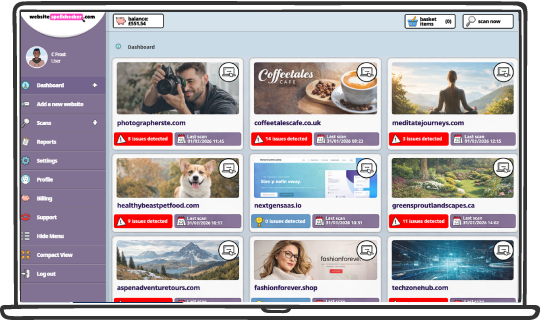
Central Dashboard
Your dashboard gives you an instant overview of every website you manage.
Each website is displayed as a visual card, making it easy to spot problem areas at a glance. This makes WebsiteSpellChecker ideal for managing multiple client sites or large projects. From here, you can:
- View all connected websites
- See collective issue counts per site
- Check last scan dates
- Navigate the site by drilling down
- Launch new scans
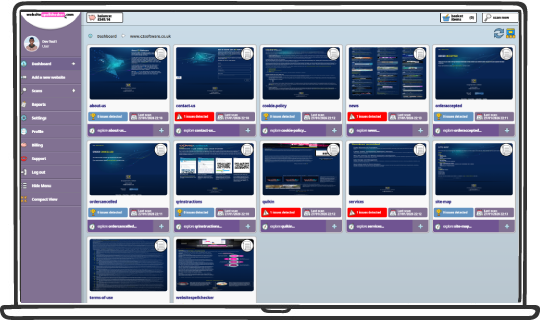
Navigate Directories & Pages
Once a website is added, the system automatically maps its structure.
This allows you to target only the areas that matter, saving time and money. You can browse:
You can browse:
- Individual pages
- Subdirectories
- Number of detected issues
- Last scan time
- Scan status
- Quick access to detailed results
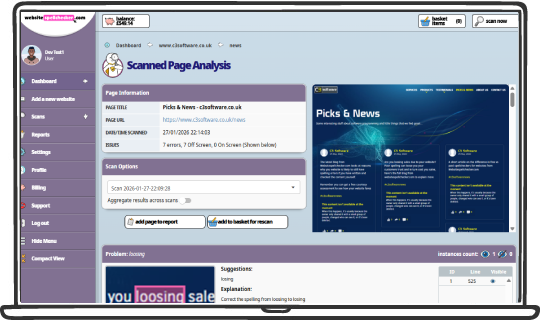
Detailed Page Analysis
Every scanned page includes a full breakdown of detected issues.
Errors are highlighted visually, so you immediately understand what needs fixing. This removes guesswork and reduces review time.
For each problem, you can see:
- The exact word or phrase
- Its location on the page
- Hidden issues
- Multiple istances grouped
- Correction suggestions
- Clear explanations
Smart Issue Detection
WebsiteSpellChecker detects more than simple spelling mistakes. It identifies:
- Spelling errors: Detects misspelled words across live website pages, including content that may have been missed during manual reviews.
- Grammar issues: Identifies grammatical problems such as incorrect sentence structure, tense errors, and improper word usage.
- Incorrect verb forms: Highlights verb tense and form issues, helping ensure content reads naturally and consistently.
- Awkward phrasing: Flags phrases that are technically correct but unclear or unnatural, with suggestions to improve readability.
- Missing words: Detects incomplete sentences and missing words that can change meaning or reduce clarity.
- Inconsistent usage: Identifies inconsistent spelling or wording across pages, helping maintain a consistent tone and style.
- Formatting problems: Highlights formatting-related issues that impact readability, such as spacing or text structure problems.
- Clear explanations & suggestions Every issue includes a short explanation and a suggested correction, making it easy to understand and fix.
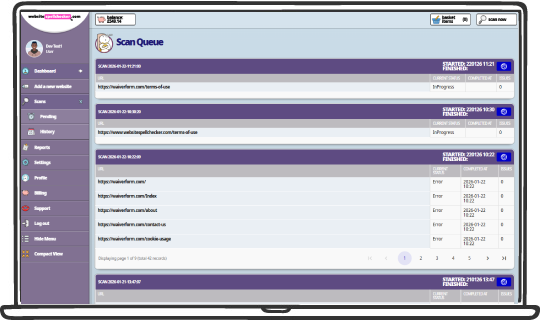
Scan Monitoring
All scans are managed through a central queue system.
This ensures large websites are processed efficiently without slowing down your workflow. Perfect for agencies running multiple client scans.
- Monitor active scans
- Track progress
- See when scans started and finished
- View pending jobs
- Access scan history
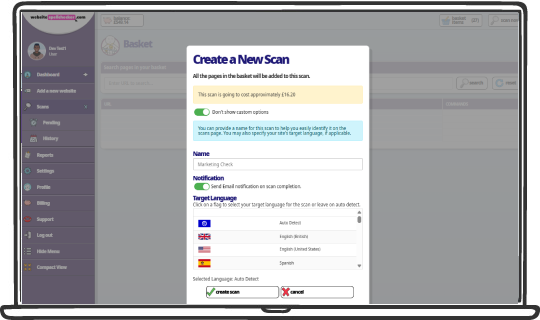
Flexible Scan Creation
Before launching a scan, you can customise it.
This allows you to tailor scans for different clients, regions, and content types.
Options include:
- Naming scans for easy reference
- Email notifications on completion
- Target language selection
- Auto language detection
- Custom scan settings
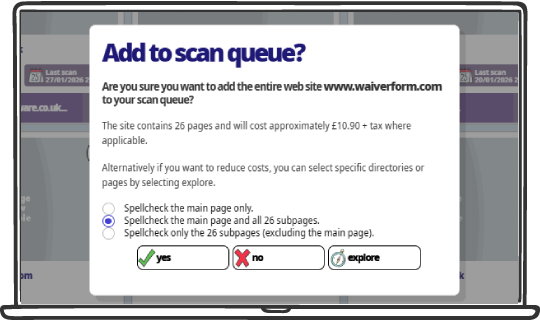
Cost Control & Page Selection
You always know what you’re paying.
This transparent pricing model helps teams stay within budget.
Before scanning, you can:
- See estimated costs along each step of the journey
- Select specific directories or pages
- Reduce unnecessary scans
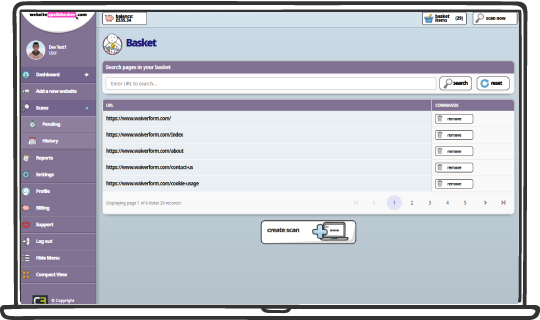
Basket & Scan Builder
Pages can be added to a basket before scanning.
Think of it as a “shopping cart” for website quality checks.
This allows you to:
- Build scans gradually
- Review selected pages
- Remove unnecessary items
- Combine multiple sites or pages into one scan
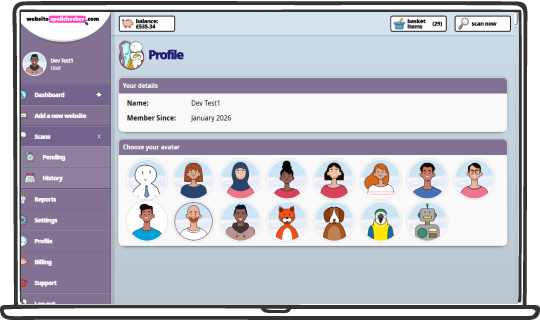
User Profile & Personalisation
Each user has a dedicated profile.
This adds a personalised experience for teams and long-term users.
You can:
- Choose an avatar
- Manage preferences
- View account history
- Track membership details
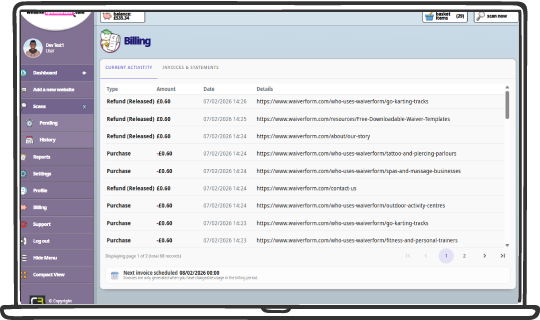
Billing & Invoice Management
Your account includes built-in balance tracking and billing management.
No subscriptions. No hidden fees. You only pay for what you scan.
You can:
- Monitor available credit
- View usage
- Manage payments
- Track costs per scan
- View refunds, you only pay for successful scans
Why Teams Choose WebsiteSpellChecker
- No browser plugins required
WebsiteSpellChecker runs entirely in the browser and can be installed as a progressive web app, with nothing to install on individual machines. - Works on live websites
Scans real, publicly accessible website pages exactly as visitors see them — no uploads, exports, or staging copies required. - Clear, actionable results
Issues are highlighted directly within page content, with explanations and suggested corrections to make fixes quick and unambiguous. - Easy reporting
Generate professional, shareable reports for teams or clients, with page summaries, issue counts, and secure access options. - Transparent pricing
Costs are shown upfront before each scan, so you always know what you’re paying before you proceed. - Only pay for what you use
Scan individual pages, directories, or entire sites as needed. No subscriptions, no unused credits, no lock-in.
Try it now for FREE!
Start with a free scan, get 10 pages FREE — no credit card required.
You’ll see results quickly and you can decide if it’s right for you.
Fill in the form below to create your new Website SpellChecker account. You must fill in all of the fields. If you are an individual, pop the name of your website in the “Company name” field.
Already have an account? Then just click here to log-in!