Technical site audit checklist: AI and content QA included

A practical technical site audit checklist covers crawlability, indexation, performance, security, AI readiness, and content quality. Run these checks now using Google Search Console, PageSpeed Insights, and Websitespellchecker to catch the issues that quietly cost you rankings and trust.
Many websites carry at least one critical technical issue — a broken redirect chain, a crawl error, or an indexing failure — that reduces search visibility without any visible warning. The good news: a structured audit finds them fast.
Run these 10 checks immediately:
- Confirm robots.txt is reachable and not blocking key pages or assets
- Validate your XML sitemap and check it is submitted in Google Search Console
- Check index coverage in Google Search Console for crawl errors and excluded pages
- Test HTTPS on all pages; look for mixed content warnings
- Run PageSpeed Insights on your homepage and top landing pages
- Check for redirect chains (A → B → C) and 4xx/5xx errors
- Verify canonical tags are set correctly on all key pages
- Test mobile friendliness using Google’s Mobile-Friendly Test
- Validate structured data (JSON-LD) on product, article, and FAQ pages
- Run Websitespellchecker across your top content pages for spelling and grammar errors
Table of Contents
- Grouped technical checks by audit area
- How to run an automated technical audit step by step
- How to prioritise audit findings
- Content and grammar checks: where automated scanning fits
- Sample audit timelines: small site vs large site
- What your audit report should include
- Key takeaways
- Day one: what to do in the first 24 hours
- Websitespellchecker keeps your content audit-ready
- Useful sources and further reading
Grouped technical checks by audit area
Crawlability and indexation
Start here. If search engines cannot reach your pages, nothing else matters. Confirm your robots.txt is accessible, correctly formatted, and not accidentally blocking CSS, JavaScript, or key page templates. Crawlability issues with sitemaps and orphan pages are among the most common silent failures in any audit.
Check your XML sitemap contains only indexable, canonical URLs — no 404s, no redirects, and no noindex pages. Use Google Search Console’s Coverage report to identify excluded pages and understand why they are excluded. Log file analysis adds another layer: it shows which pages Googlebot actually visits versus which pages you think it visits.
- Robots.txt reachable and correctly configured
- XML sitemap valid, submitted to Google Search Console, and free of redirected or excluded URLs
- Index coverage report reviewed; excluded pages investigated
- Orphan pages identified and linked from at least one other page
- Log files reviewed to confirm crawler behaviour
Redirects, canonicalisation, and broken links
Redirect chains, canonical tag errors, and broken links are common causes of indexing gaps and ranking loss. Simplify any A → B → C chains to a direct A → C redirect. Check that canonical tags are not self-contradictory and that hreflang tags on international pages point reciprocally to each other.
| Check | Tool | Pass Condition |
|---|---|---|
| Redirect chains | Screaming Frog | No chain longer than one hop |
| 4xx errors | Screaming Frog / Google Search Console | Zero on key pages |
| 5xx errors | Server logs / Google Search Console | Zero |
| Canonical tags | Screaming Frog | Consistent, no conflicts |
| Hreflang reciprocity | Screaming Frog | Every hreflang has a return tag |
Performance and Core Web Vitals
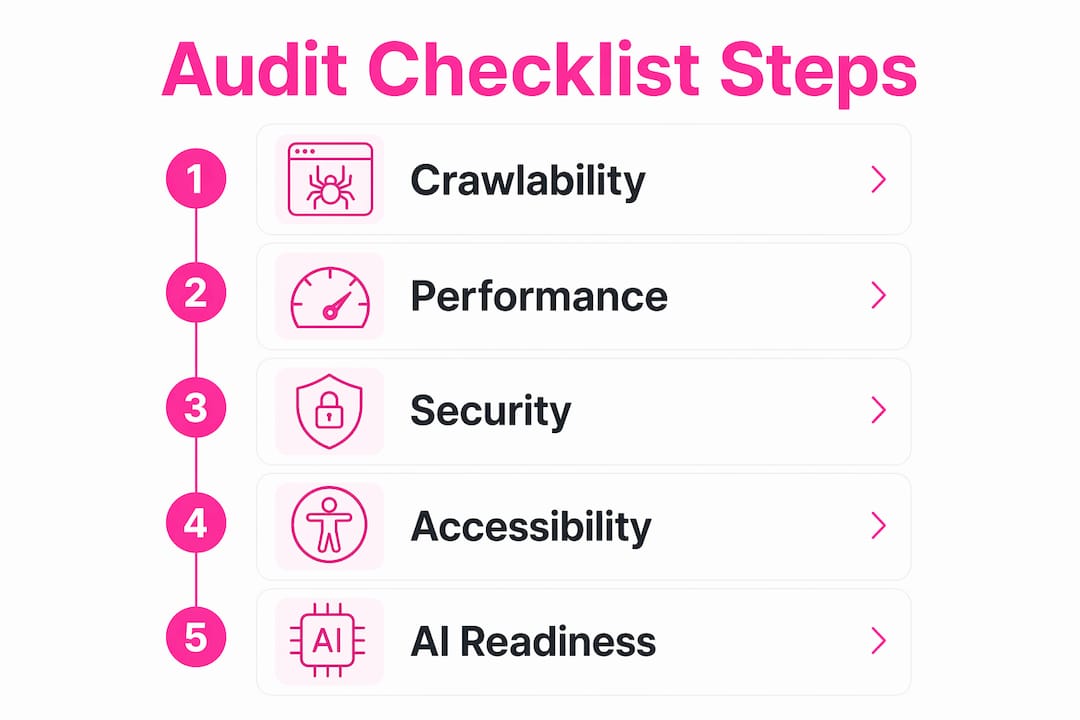
Core Web Vitals thresholds to meet: LCP under 2.5 seconds, INP under 200 milliseconds, CLS under 0.1. Use PageSpeed Insights for both field data (real users) and lab data (simulated). Lighthouse gives a deeper breakdown of opportunities: image formats, critical CSS, and third-party script impact.
Industry studies show that over 50% of mobile users abandon pages that take longer than three seconds to load. Prioritise LCP fixes on mobile before anything else.
Security and server
Every page must serve over HTTPS with a valid, non-expiring SSL certificate. HTTP should redirect to HTTPS with no mixed content warnings. Check that HSTS is configured and that security headers (Content-Security-Policy, X-Frame-Options) are present. A single broken SSL certificate can trigger browser warnings that chip away at trust instantly.
Mobile and accessibility
Run Google’s Mobile-Friendly Test on key templates, not just the homepage. Check tap targets are large enough (at least 48×48px), the viewport meta tag is set, and text is readable without zooming. For accessibility, a tool such as WAVE or axe covers WCAG 2.1 AA basics; see accessibility checker alternatives for options.

Structured data and AI visibility
AI visibility is now a core part of technical health. Validate JSON-LD schema on product, article, FAQ, and LocalBusiness pages using Google’s Rich Results Test. Check that critical content appears in the initial HTML response so AI crawlers can read it without executing JavaScript. Consider adding an llms.txt file to signal which content AI agents may use, and audit entity consistency across your pages so AI tools can reliably identify and cite your brand.
JavaScript SEO
If your site relies heavily on client-side rendering, critical content and internal links must appear in the initial HTML. Use Google Search Console’s URL Inspection tool to fetch and render a page and compare the rendered HTML against the raw source. Internal links hidden behind JavaScript interactions are invisible to crawlers.
How to run an automated technical audit step by step
Automated scanning tools are far more efficient than manual checks for any site of meaningful size. A reliable audit follows a clear sequence: discovery → fetch → render → index → rank. Running checks in this order prevents false positives and wasted effort.
Step-by-step audit sequence:
- Discovery and logs — Open Google Search Console. Review the Coverage report and check server logs to confirm which pages are being crawled and indexed.
- Crawl — Run Screaming Frog (or a cloud crawler) across the full site. Export redirect chains, 4xx/5xx errors, missing canonical tags, and duplicate titles.
- Render and JavaScript checks — Use Google Search Console’s URL Inspection to render key pages. Compare rendered HTML to raw source for missing content or links.
- Performance — Run PageSpeed Insights and Lighthouse on your homepage, top landing pages, and a representative blog post. Capture both field and lab data.
- Schema and AI visibility — Validate JSON-LD with Google’s Rich Results Test. Check llms.txt and entity consistency for AI readiness.
- Content QA — Once technical crawlability is confirmed, run Websitespellchecker across your site. The tool scans every page for spelling mistakes, grammar errors, awkward phrasing, and missing words, producing an instant report you can share with your content team.
Pro Tip: Schedule a lightweight automated scan monthly (Search Console review, PageSpeed spot-check, Websitespellchecker content scan) and a full crawl-to-content audit quarterly. This cadence catches regressions before they compound.
How to prioritise audit findings
Not every issue deserves the same urgency. A simple four-tier framework keeps teams focused on what actually moves the needle.
| Severity | Definition | Examples | Fix Timeline |
|---|---|---|---|
| Blocking | Prevents indexing or causes site-wide damage | robots.txt Disallow on all pages, site-wide noindex, major 5xx errors, broken SSL | Fix within 24 hours |
| High | Significant ranking or trust impact | Redirect chains, missing canonical tags, LCP > 4s, hreflang errors | Fix within one week |
| Medium | Moderate impact; affects specific pages | Missing meta descriptions, thin content, slow images | Fix within one sprint |
| Low | Minor or cosmetic | Minor copy inconsistencies, non-critical alt text gaps | Backlog |
Fix blocking issues before anything else. A site-wide noindex or a robots.txt that blocks Googlebot renders every other optimisation pointless. Once blocking issues are resolved, work through high-severity items by impact-to-effort ratio: quick wins (high impact, low effort) come before large infrastructure changes.
Assign an owner and an estimated completion date to every finding at the point of triage. Issues without owners do not get fixed.
Content and grammar checks: where automated scanning fits
Technical audits and content quality reviews solve different problems. Technical checks are machine-facing: they confirm crawlers can reach and parse your pages. Content checks are human-facing: they confirm your pages are accurate, readable, and trustworthy. Mixing the two in a single pass leads to incomplete work on both fronts.
Spelling and grammar errors do not just frustrate readers — they signal to search engines that a page may be low quality. A single typo on a product page can reduce conversion rates and undermine the credibility your technical SEO work has built.
Content QA checklist:
- Title tags unique, 50–60 characters, include target keyword
- Meta descriptions unique, 140–160 characters, include a clear benefit
- One H1 per page, containing the primary keyword
- H2/H3 headings structure content logically
- Duplicate or near-duplicate content identified and resolved
- Image alt text descriptive on all content images
- Spelling and grammar checked across all pages with Websitespellchecker
Workflow for content teams: scan with Websitespellchecker → sample-verify flagged issues manually → assign fixes to writers → re-scan to confirm resolution.
Pro Tip: Include an automated spelling scan in every monthly lightweight check. Websitespellchecker’s scan history lets you compare results over time, so you catch regressions introduced by new content or CMS updates before they accumulate.
Sample audit timelines: small site vs large site
| Factor | Small site (≤300 pages) | Large site (more than 300 pages) |
|---|---|---|
| Duration | 1–2 days | 2–4 weeks (phased) |
| Team size | 1–2 people | Cross-functional (SEO, dev, content, infra) |
| Crawl approach | Full crawl in one pass | Segmented by template or section |
| Content QA | Full site scan | Priority sections first, then full scan |
| Regression detection | Monthly re-scan | Automated diffing after each deploy |
| Report format | Single spreadsheet | Prioritised issue tracker with owners |
Large sites benefit from phased audits and regression diffing — comparing scan results over time rather than relying on one-off snapshots catches newly introduced issues after deploys. For small sites, a single focused day with Google Search Console, Screaming Frog, PageSpeed Insights, and Websitespellchecker covers the full scope.
A quarterly deep audit suits most businesses. Sites that publish frequently or change infrastructure often benefit from monthly lightweight checks as well.
What your audit report should include
A good audit report makes every finding reproducible and every fix assignable. These are the fields that matter:
| Field | Description |
|---|---|
| Issue ID | Unique reference for tracking (e.g. TECH-A) |
| Area | Crawl, index, performance, security, or content |
| Severity | Blocking / High / Medium / Low |
| Impact | What ranking, trust, or user experience effect this has |
| Reproduction steps | URL(s) affected and how to replicate the issue |
| Suggested fix | Specific action with tool or code reference |
| Owner | Named person or team responsible |
| ETA | Target completion date |
| Verification | How to confirm the fix is live |
Include before-and-after screenshots, Lighthouse or PageSpeed field metrics, log excerpts, and example URLs for every high or blocking issue. A downloadable audit report template in CSV or PDF format makes it straightforward to import findings into Jira, Asana, or a shared spreadsheet.
Websitespellchecker’s downloadable scan reports cover the content QA rows of this template, giving you a shareable PDF that slots directly into the wider audit deliverable.
Key takeaways
A complete technical site audit checklist combines automated crawl and performance checks with content quality scanning to protect both search visibility and reader trust.
| Point | Details |
|---|---|
| Audit cadence | Run a lightweight scan monthly and a full audit quarterly to catch regressions early. |
| Prioritise blocking issues | Fix robots.txt errors, site-wide noindex, and major 5xx issues within 24 hours before anything else. |
| Core Web Vitals targets | Aim for LCP under 2.5s, INP under 200ms, and CLS under 0.1 on all key pages. |
| AI visibility checks | Validate JSON-LD schema, check llms.txt, and confirm critical content appears in initial HTML. |
| Websitespellchecker for content QA | Run Websitespellchecker as part of every monthly scan to catch spelling and grammar regressions across the full site. |
Day one: what to do in the first 24 hours
The most practical approach on day one is to focus on the checks that could be causing active damage right now. Open Google Search Console first and look at the Coverage report. A site-wide noindex or a robots.txt blocking Googlebot needs to be fixed before you do anything else.
Run PageSpeed Insights on your homepage and your highest-traffic landing page. If LCP is above four seconds on mobile, that is a high-severity fix. Then run a quick Screaming Frog crawl to surface redirect loops, 4xx errors, and missing canonical tags. Finally, run Websitespellchecker on your homepage and top content pages. Spelling errors on high-visibility pages undermine the credibility that your technical work is trying to build.
When you communicate findings to stakeholders, lead with the blocking and high-severity items and attach a clear owner and ETA to each one. A short summary table (severity, issue, owner, ETA) is far more useful than a long narrative report at this stage.
Websitespellchecker keeps your content audit-ready
Every technical fix you make is more valuable when the content it surfaces is clean, professional, and error-free. Websitespellchecker scans your entire site in one pass, flagging spelling mistakes, grammar errors, awkward phrasing, and missing words across every page, in multiple languages.

It fits naturally into the monthly lightweight scan: once your technical checks are done, a Websitespellchecker scan takes minutes and produces a detailed, shareable PDF report. Scan history means you can track regressions over time, not just catch errors once. There is no monthly subscription — you pay per page scanned, with a free tier to get started.
Business owners and marketing professionals use it to maintain a polished, trustworthy presence without the time cost of manual proofreading. Start your first scan today and see exactly where your content stands.
Useful sources and further reading
- Google Search Console Help — primary source for index coverage, crawl errors, and Core Web Vitals field data; cite this in executive summaries for credibility
- PageSpeed Insights — field and lab data for Core Web Vitals; use for LCP, INP, and CLS benchmarks
- Google Lighthouse documentation — lab-based performance and accessibility auditing
- Screaming Frog SEO Spider — crawl-based audit tool for redirect chains, canonical tags, and missing metadata
- Google Rich Results Test — validates JSON-LD structured data for schema coverage
- ZDNet: How to check if AI tools will cite your website — practical guide to AI visibility checks including llms.txt and entity consistency
- Websitespellchecker: website audit checklist guide — extended checklist and templates for teams running full audits
A note on UK relevance: all tools listed above are available to UK-based teams. Google Search Console and server log analysis are the primary sources for validating any issue before escalating it to a developer or raising it in a stakeholder report. For executive summaries, cite Google Search Console data and PageSpeed Insights field metrics as your primary evidence — these carry authority with non-technical stakeholders.