B2B SaaS proofreading tools for UK sites: pick the right one

For UK businesses that need site-wide automated proofreading, Websitespellchecker is the recommended solution. It combines a full site crawler, custom glossaries for brand terminology, and a pay-per-page model with no monthly subscription, so you pay only for what you scan. Run a free sample scan today to see exactly what is living on your live site.
Table of Contents
- What do B2B SaaS proofreading tools actually do?
- How do you choose the right B2B site-wide proofreading tool?
- How Websitespellchecker maps to what UK businesses need
- How to implement site-wide automated proofreading in your workflow
- What does a pay-per-page pricing model mean for your ROI?
- What UK compliance checks should you run before buying?
- What results can you realistically expect from a pilot?
- Key takeaways
- Why brand drift is the problem most teams underestimate
- No subscription needed: try Websitespellchecker on your site
- Useful sources
What do B2B SaaS proofreading tools actually do?
Most teams assume a browser extension or a single-page grammar checker covers their bases. It does not. A site-wide proofreading tool sends a crawler across every URL on your domain, the same way a search engine bot does, and flags issues at scale.
Grammar checkers that work across individual documents or browser tabs still check one page at a time. A site-wide scanner, by contrast, audits your entire domain in a single pass and surfaces issues you would never catch manually.
The issue types a good B2B tool detects go well beyond a red squiggle:
- Spelling and typos across all published pages, including dynamically generated content
- Grammar and punctuation errors that erode professional credibility
- Style inconsistencies, such as mixed British and American English or inconsistent capitalisation
- Terminology and brand violations, where product names or approved phrases are used incorrectly
- Formatting problems and missing text in templates or CMS blocks
Outputs matter as much as detection. Enterprise AI content solutions deliver actionable issue lists, exportable PDF reports, and scan history logs so your team can track remediation over time, not just react to a one-off list. Those audit logs are what turn a proofreading scan into a proper quality-assurance process.
Errors on live pages chip away at trust, and they affect search rankings too. A page with repeated spelling mistakes signals low quality to both readers and search engines, making site-wide error detection a practical SEO concern, not just an editorial one.
How do you choose the right B2B site-wide proofreading tool?
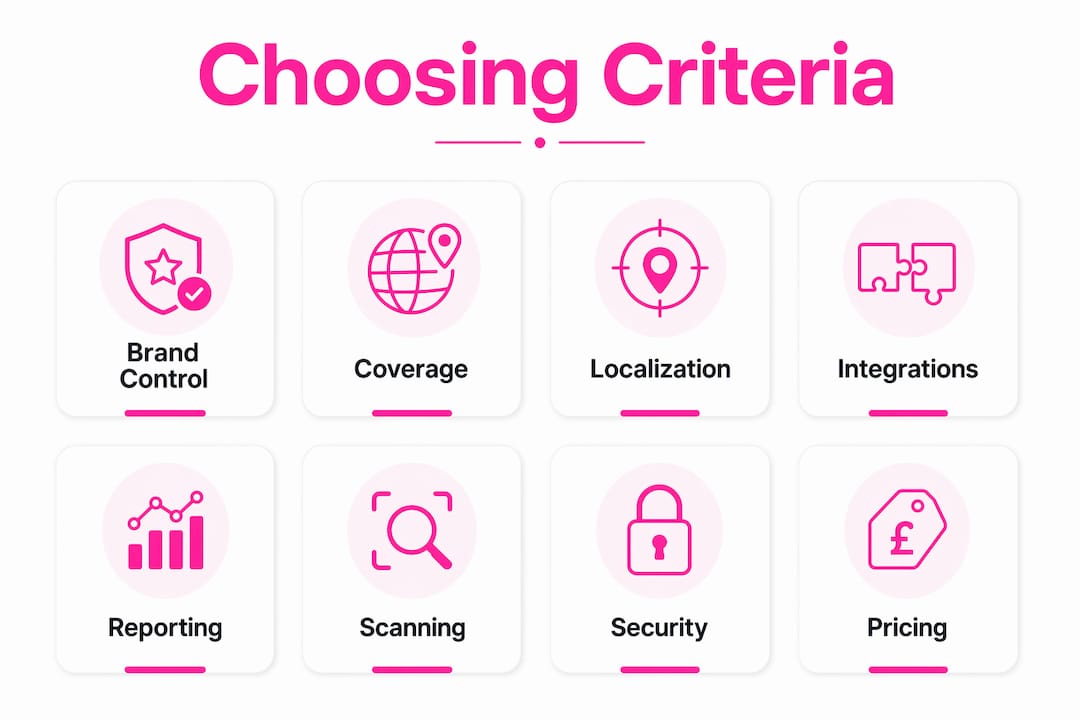
The selection criteria that matter most for UK businesses fall into eight areas. Weight them in this order: brand control and integrations first, then compliance, then price.
Coverage. The tool must crawl your entire site, not just pages you paste in manually. Ask vendors to confirm their crawler handles JavaScript-rendered content and authenticated pages.

Multi-language and localisation support. If your site serves audiences in more than one language, the tool needs to handle each correctly. British English and American English are treated as separate language profiles by any serious platform.
Custom dictionaries and brand rules. Technical documentation teams and regulated industries consistently name bespoke configuration as the deciding purchase factor. A tool that flags your product names as errors wastes more time than it saves. Ask vendors whether their knowledge base supports custom glossaries and terminology rules.
Integrations. CMS plugins, API access, and SSO reduce friction. Tools that force copy-paste workflows suffer adoption loss and introduce accuracy problems when content loses its original context.
Reporting and audit logs. Exportable PDF reports and scan history are non-negotiable for agencies and internal teams that need to demonstrate QA value to leadership.
Scanning cadence. Can you schedule incremental scans after content updates, or only run one-off checks?
Security and compliance. Data residency, processing agreements, and encryption matter under UK GDPR. More on this below.
Pricing model. Pay-per-page credit models suit variable publishing schedules better than flat monthly fees. Avoid tools with mandatory monthly minimums if your scan volume fluctuates.
Red flags to watch for: no site crawler (only single-page checks), no custom glossary, no exportable reports, unclear data residency, and pricing that locks you into a minimum spend regardless of usage.
How Websitespellchecker maps to what UK businesses need
Websitespellchecker addresses each of the criteria above directly. Its AI scanning technology crawls entire websites in one pass, identifies spelling mistakes, grammatical errors, awkward phrasing, missing words, inconsistent usage, and formatting problems, then tracks changes over time so you can see whether errors are recurring or being fixed.
| Evaluation dimension | Websitespellchecker capability |
|---|---|
| Coverage | Full site crawler across all published pages |
| Multi-language support | Multiple languages supported, including British English |
| Brand rules / custom glossaries | Bespoke scan configuration and terminology knowledge base |
| Integrations | API access available; CMS and SSO options |
| Reporting | Downloadable, shareable PDF reports |
| Scan history / audit logs | Change tracking over time for remediation monitoring |
| Pricing model | Pay-per-page credits; free trial allowance included |
| UK GDPR / data handling | Compliance-aware; review DPA on request |
During a sample scan or free trial, you should expect to see a prioritised list of errors by page, a summary report you can download as a PDF, and a baseline count of issues across your scanned pages. Use that baseline as your pilot success metric: track errors found, pages scanned, and time saved compared with a manual review.
The pay-per-page model means there is no subscription commitment before you have seen results. That is a practical starting point for any UK business evaluating proofreading solutions.
How to implement site-wide automated proofreading in your workflow
A staged rollout avoids the common mistake of scanning everything at once and producing a report too large to act on.
- Select your pilot pages. Choose a representative sample of pages covering your key content types: product pages, blog posts, and any regulated or legal copy: product pages, blog posts, and any regulated or legal copy.
- Run the initial crawl. Let Websitespellchecker scan the pilot set and generate your first PDF report.
- Review and configure. Go through the report, identify any false positives, and add approved terminology to your custom glossary.
- Define remediation tickets. Assign errors to editors or content owners with clear priority levels.
- Schedule incremental scans. Once the pilot is clean, set up regular scans to catch regressions after content updates.
- Integrate with your CMS or ticketing system. Use the API to push issues directly into your existing workflow rather than managing a separate spreadsheet.
- Enable SSO and role permissions. Control who can view reports and who can action fixes.
- Train editors. A short walkthrough of the report format and glossary management is usually enough.
Pro Tip: Start with a staged pilot of a representative sample of pages covering your key content types and measure errors fixed per editorial hour. That single metric gives you the ROI figure you need to justify full deployment to leadership.
Inline CMS integration or API hooks are worth prioritising over copy-paste workflows. When content is pasted out of its CMS context, formatting and dynamic fields are lost, and the scan results become less reliable.
What does a pay-per-page pricing model mean for your ROI?
B2B proofreading SaaS products typically fall into three pricing shapes: pay-per-page credits, usage tiers with a monthly cap, and flat monthly subscriptions. For UK businesses with variable publishing schedules, pay-per-page is usually the most cost-effective starting point because you are not paying for capacity you do not use.
A simple break-even calculation works like this. Estimate how long a content editor spends manually reviewing a single page for errors, multiply that by your average hourly editorial rate, and compare it with the cost per page of an automated scan. For most UK teams, the automated scan costs a fraction of the manual equivalent, and it catches errors a tired editor misses.
The free vs paid comparison is worth reading before you commit to any tier. Free tools cover surface-level checks; paid site crawlers handle scale, brand rules, and the audit trail that procurement teams require.
Prioritise feature fit over the lowest price per page. A tool without custom glossaries or exportable reports will cost you more in wasted editorial time than a slightly higher per-page rate on a tool that does the job properly.
What UK compliance checks should you run before buying?
UK GDPR applies to any service that processes content from your website, particularly if that content includes personal data. Before signing a contract, verify the following:
- Data residency: Where is your content processed and stored? UK or EU hosting is preferable for most UK organisations.
- Data processing agreement (DPA): Request a signed DPA before any live data is scanned.
- Encryption: Confirm encryption in transit (TLS) and at rest.
- Access controls and audit logs: Role-based access and exportable audit logs support your internal data governance policies.
- Retention and deletion: How long does the vendor retain scanned content, and can you request deletion?
- Certifications: Ask whether the vendor holds SOC 2 or ISO 27001 certification.
Enterprise proofreading tools increasingly offer GDPR-aware hosting options as a standard feature, not an add-on. If a vendor cannot answer these questions clearly during procurement, that is a red flag. Record your compliance decisions and the vendor’s responses in your procurement paperwork so you have a clear audit trail.
What results can you realistically expect from a pilot?
Realistic pilot metrics give you something concrete to report internally. The table below is a template you can populate from your own trial results.
| Metric | Pilot baseline | After remediation |
|---|---|---|
| Pages scanned | e.g. | — |
| Total issues found | Record from PDF report | Record after fixes |
| Critical errors (spelling/grammar) | Record from report | Target: zero |
| Brand/terminology violations | Record from report | Target: zero |
| Manual QA time saved (hours) | Estimate vs manual review | Cumulative saving |
| Scan-to-fix cycle time | First scan date to sign-off | Track per sprint |
Use Websitespellchecker’s agency and developer features to generate client-ready reports if you are managing multiple sites. The scan history gives you a regression monitor: if new errors appear after a content update, the next scheduled scan will surface them before they reach a client review.
Key takeaways
Automated site-wide proofreading is the most cost-effective quality gate for UK businesses: catching errors before they go live costs far less than fixing them after readers and search engines have already seen them.
| Point | Details |
|---|---|
| Site crawl is non-negotiable | Single-page tools miss the scale of errors that live across a full domain. |
| Brand rules decide the purchase | Custom glossaries prevent false positives and protect terminology in regulated or technical content. |
| Pay-per-page suits variable teams | Credit-based pricing means you pay for scans you run, not capacity you might use. |
| Compliance needs a paper trail | Request a DPA, confirm data residency, and log vendor responses before any live scan. |
| Websitespellchecker covers all dimensions | Site crawler, custom glossaries, PDF reports, scan history, and a free trial with no subscription required. |
Why brand drift is the problem most teams underestimate
Most teams focus on catching typos. The harder problem is brand drift: the slow accumulation of inconsistent terminology, mixed spelling conventions, and off-brand phrasing that builds up across a site over months of edits by different contributors. A single typo is easy to spot. Three hundred pages where your product name is capitalised four different ways is not.
Automated site-wide scanning addresses both problems at once, but the custom glossary is what makes it genuinely useful for a business rather than just a spell check at scale. Without it, you spend more time dismissing false positives than fixing real errors. The tools that get adopted are the ones that respect your terminology from day one.
The pay-per-page model matters here too. It removes the pressure to justify a monthly subscription before you have seen results, which means you can run a real pilot, measure it honestly, and make a decision based on evidence rather than a sales call.
No subscription needed: try Websitespellchecker on your site
Websitespellchecker gives UK businesses a concrete alternative to manual QA: a full site crawler that finds spelling mistakes, grammar errors, and brand inconsistencies across every page, with downloadable PDF reports and scan history included. There is no monthly subscription. You buy page-scan credits and use them when you need them.

The business owner landing page explains the pay-per-page model and what a free trial covers. Marketing teams can find brand-control and reporting details on the marketing professionals page. To book a demo, have your site URL, an estimate of your page count, and a note of any custom terminology you need the glossary to handle. The team will configure a pilot scan from there.
Useful sources
- UK GDPR guidance — ICO: The Information Commissioner’s Office resource for UK organisations navigating data processing obligations; essential reading before signing any vendor DPA.
- Websitespellchecker — the app: Full product documentation covering the site crawler, scan history, PDF reports, and configuration options.
- Websitespellchecker packages and pricing: Credit tiers and pay-per-page pricing details for UK businesses evaluating cost per scan.
- How to check grammar mistakes in website content: Practical editorial checklist for content teams setting up a remediation workflow.
- AI tools for business professionals: Independent roundup of how proofreading and content quality tools fit into a broader business tech stack.
- Website quality assurance tools: Overview of how automated proofreading sits within a wider site QA programme.