Content regression testing catches copy errors before customers do

Content regression testing is automated, site-wide scanning and change-tracking that finds copy regressions, spelling slips, grammar faults, broken formatting, before they damage trust or search visibility. It works by comparing your website’s copy against previous scans, flagging anything that has newly gone wrong. The result: you catch a typo on a pricing page the same day it appears, not three months later when a customer emails to ask why “your” is spelled “you’re” on the checkout button.
Three things to do right now:
- Scan one high-value page (homepage, pricing, or top landing page) to see what a baseline report looks like.
- Set a weekly or fortnightly cadence for pages that change often, and monthly for stable ones.
- Run a small pilot across 10-20 pages before rolling it out site-wide.
Key Takeaways
Content regression testing works because it replaces reactive, manual proofreading with continuous, automated change-tracking that catches copy errors the moment they appear.
| Point | Details |
|---|---|
| Scope matters | Content regression testing covers copy quality only: spelling, grammar, formatting, and terminology consistency, not code behaviour. |
| Errors carry real cost | Visible mistakes damage buyer trust and conversion, while AI tools summarising flawed pages can repeat the error elsewhere. |
| Start with a pilot | Scan 10-20 high-value pages first, build a glossary, and refine severity thresholds before scanning site-wide. |
| Tier your review cadence | Core commercial pages need monthly checks; low-traffic archives can wait quarterly or get consolidated. |
| Automation needs a human checkpoint | Treat flags as a first pass; Website SpellChecker’s scan history and reports give teams a low-friction way to start monitoring copy quality automatically. |
Table of Contents
- What content regression testing actually covers
- Why copy errors cost you trust, conversions and rankings
- How does automated content regression testing work?
- How to launch a content regression testing pilot
- Governance, scoring and keeping quality consistent
- Where AI checking still gets it wrong
- Prioritising regressions when you can’t fix everything at once
- What successful rollouts tend to have in common
- Choosing tools for automated content quality checks
- Scaling content regression testing as your site grows
- What we’ve learned from watching sites fail quietly
- Run your first scan and see what’s actually live on your site
- Sources
What content regression testing actually covers
Content regression testing, in this sense, has nothing to do with re-running functional tests after a code deployment. It is purely about the words on your pages. Think of it as quality assurance for copy: a system that watches your live site and tells you when the writing has quietly got worse.
Here’s what it typically catches:
- Spelling and grammar slips introduced during an edit, a CMS migration, or a rushed content update.
- Broken formatting such as missing bullet points, collapsed tables, or headings that lost their styling.
- Removed or altered calls-to-action, where a button label changes or disappears entirely during a template update.
- Inconsistent terminology, like a product name spelled two different ways across your site.
The distinction that matters most is continuous monitoring versus periodic audits. A one-off manual proofread catches whatever exists on the day you check. Continuous scanning catches what changes afterwards, which is where most damage actually happens, quietly, between audits, while nobody’s looking.
Why copy errors cost you trust, conversions and rankings
A visible typo on a pricing page does not just look sloppy. It makes a visitor question everything else on the page, including whether your product works as described. That doubt compounds at the exact moment someone is deciding whether to buy.
There’s a second, less visible cost: content decay. Pages lose quality gradually as edits pile up, templates shift, and nobody notices until traffic has already dropped. Ahrefs’ research on content decay shows that proactive monitoring using change timelines catches pages slipping in health well before the traffic graph confirms the damage.
The AI-discovery angle raises the stakes further. An analysis of AI-generated citations found that a significant share contain fabrications or errors, which means:
- AI tools summarising your content can amplify an error you never caught.
- Search engines increasingly reward pages that read as clean and authoritative.
- A single wrong figure or garbled sentence can get repeated by an AI assistant to someone who never visited your site.
Automated quality gates exist precisely to stop that error reaching publication in the first place.
How does automated content regression testing work?
The mechanics are simpler than they sound. A crawler discovers your pages, either from a sitemap or by following internal links, then you configure which sections to include or exclude (you probably don’t want it flagging your legal boilerplate the same way it flags your homepage headline).
From there, the system takes a snapshot of each page’s text and formatting. Every subsequent scan compares the new snapshot against the last one, a process called diffing, and classifies what changed: a fixed typo, a new typo, a formatting shift, a missing CTA. Not every difference is a problem, so severity handling matters. A single misplaced comma should not trigger the same alert as a broken pricing table.
Here’s what a functioning setup includes:
- Scan history so you can see how a page’s quality trended over the last six months, not just its current state.
- Detailed error reports that show exactly where the issue sits, what it says now, and what changed.
- False-positive handling so brand names, code snippets, and quoted material don’t get flagged repeatedly.
- API and CMS integration so scan results can feed into your existing workflow rather than sitting in a separate dashboard nobody checks.
Pro Tip: Build an ignore list for brand names, product SKUs, and industry jargon before your first full scan. Skipping this step is the single biggest cause of alert fatigue in the first month.
Trend reporting matters more than people expect going in. A single scan tells you today’s error count. A history of scans tells you whether your editorial process is improving or slowly leaking quality, which is the more useful question.
How to launch a content regression testing pilot
Rolling this out across an entire site on day one is a mistake. Start narrow, prove the value, then expand.
- Pick pilot pages by value and risk. Choose your homepage, top three landing pages, and any page that changes weekly. Skip low-traffic archive pages for now.
- Set your KPIs before you start. Decide what “success” looks like: fewer live errors, faster time-to-fix, or reduced reviewer hours.
- Configure crawls and protections. Build your ignore list, add brand terms to a glossary, and set your scan cadence per page tier.
- Define severity levels and quality gates. Not every issue needs a human review; only the serious ones should block publishing.
- Integrate outputs into your existing workflow. Route flagged issues into your ticketing system or CMS so nobody has to check a separate tool.
- Measure false positives and reviewer time. Track how much of the reviewer’s week goes to genuine fixes versus noise.
| Pilot phase | What to configure |
|---|---|
| Week 1 | Baseline scan of 10-20 priority pages, glossary set up |
| Week 2 | Severity thresholds defined, ignore list refined |
| Week 3 | Workflow integration tested with real tickets |
| Week 4 | Cadence locked in, results compared to KPIs |
NEURONwriter’s governance research recommends tiering review cadence by page importance: core pages monthly, high-traffic blog content quarterly, and thin or outdated pages earmarked for consolidation rather than endless re-checking.
Governance, scoring and keeping quality consistent
Scaling content without a scoring rubric is how sites end up full of “good enough” copy that nobody actually approved. Define objective criteria early: readability, terminology consistency, formatting integrity, and factual accuracy each deserve a weighting.
Research on AI content quality gates shows that organisations enforcing numeric thresholds, starting low and raising the bar as the process matures, see measurably better first-submission pass rates than teams relying on ad hoc review.
A few practices keep this manageable:
- Maintain a shared glossary so brand terms, product names, and regional spelling variants never get flagged as errors.
- Set review cadences by tier rather than treating every page identically.
- Keep a human in the loop for flagship pages; automated scoring should support editorial judgement, not replace it.
Pro Tip: Start your quality gate at a low, achievable threshold. Setting the bar too high in month one just trains your team to ignore the alerts.
Measuring success isn’t complicated: track error counts over time, reviewer hours saved, and how often flagged issues turn out to be genuine.
Where AI checking still gets it wrong
No automated system is flawless, and content regression tools inherit some predictable weaknesses from the AI models underneath them.
False positives are the most common complaint. A tool trained on general English can flag a legitimate brand name, an intentional sentence fragment used for style, or an industry term as an error. Without a maintained glossary, this creates alert fatigue fast, and tired reviewers start ignoring flags altogether, including the real ones.
Token and length limits cause a second class of problem. Very long pages sometimes get chunked for processing, and context that spans a chunk boundary can confuse the classifier, occasionally producing a flag that makes no sense once you read the full paragraph. Shiftum’s research on content automation at scale notes that AI systems are reliably good at scale and speed but have predictable blind spots, like enforcing exact length limits or catching subtle tone shifts, that still need a human or a rules-based check layered on top.
There’s also a genericity risk worth naming honestly. Research on AI-generated brand content warns that leaning entirely on automated systems, without editorial judgement in the loop, can quietly erode what makes your writing sound like you rather than a template. The fix isn’t abandoning automation. It’s treating flags as a first pass that a human confirms, not a final verdict.
Prioritising regressions when you can’t fix everything at once
Not every flagged issue deserves the same urgency, and treating them equally is how review queues become unmanageable within a month.
Severity should map to visibility and business impact, not just error type. A typo on your homepage headline outranks the same typo buried in a five-year-old blog post, even though the underlying technical fix is identical. Build your triage around three questions: how many visitors see this page, how close is the error to a conversion point, and how long has it been live.
A practical hierarchy looks like this:
- Tier one, fix same day: errors on pricing, checkout, or homepage copy, and anything touching a call-to-action.
- Tier two, fix within the week: high-traffic blog posts, category pages, and anything ranking for commercial-intent keywords.
- Tier three, batch monthly: low-traffic archive content, old campaign pages, and anything scheduled for consolidation anyway.
TeamBench’s research on AI content workflows recommends a submit, score, improve, re-score loop rather than a single pass. That structure naturally surfaces your worst offenders first, since anything failing repeatedly gets escalated automatically instead of sitting in a flat queue.
Resourcing follows the same logic. Give your best reviewer the tier-one queue and let a lighter, batched process handle tier three. Chasing every flag with equal urgency burns reviewer time on low-stakes fixes while a homepage error sits live for a week.
What successful rollouts tend to have in common
Teams that get real value from content regression testing share a pattern, even across different industries and site sizes. They start narrow, measure honestly, and resist the urge to scan everything on day one.
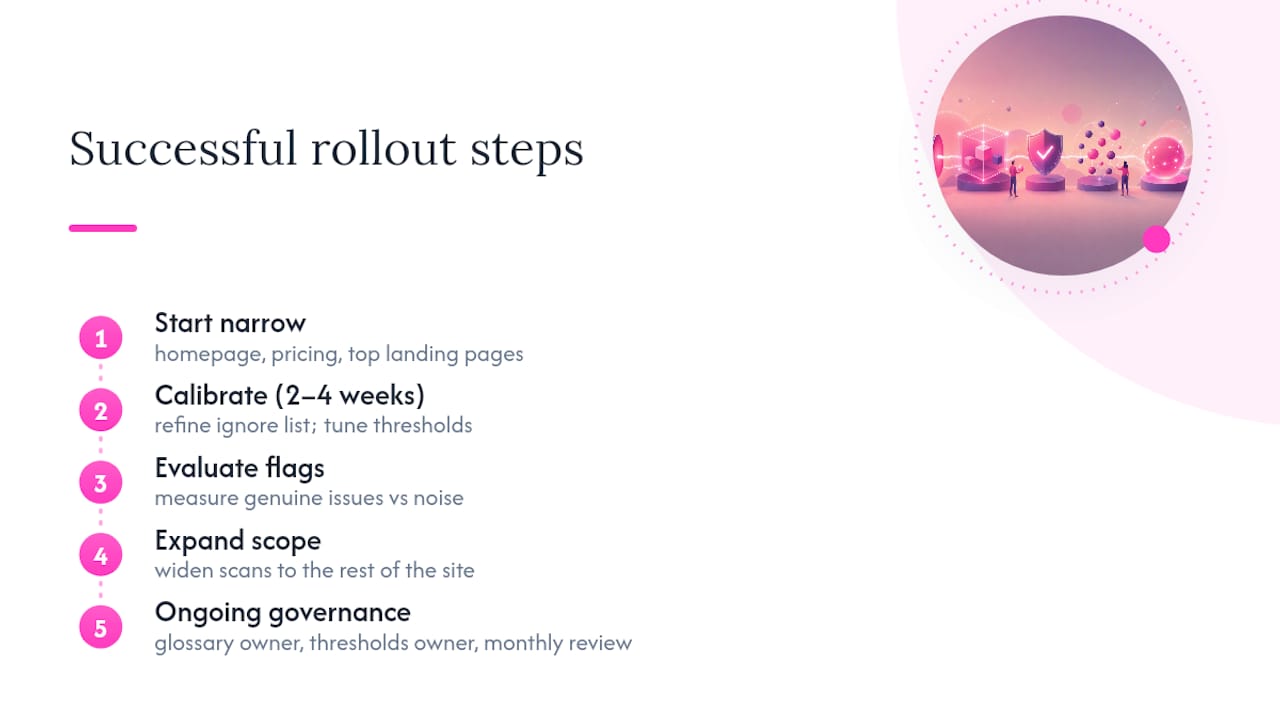
A typical successful rollout begins with a handful of commercially important pages, homepage, pricing, and top landing pages, and runs for two to four weeks before expanding. During that window, the team refines its ignore list, tunes severity thresholds, and gets a feel for how many flags are genuine versus noise. Only after that calibration does the scan scope widen to the rest of the site.
The teams that struggle tend to skip that calibration step. They switch on full-site scanning immediately, get flooded with false positives from unfamiliar brand terms and product names, and conclude the tool is unreliable within a fortnight. The tool wasn’t the problem; the glossary was empty.
Shiftum’s case data on content automation shows that pairing automated scanning with structured moderation, native-speaker review layered on top of the machine pass, cut turnaround from days to minutes on large-scale content projects, while keeping quality consistent. The pattern holds outside translation contexts too: automation handles scale and speed, a defined human checkpoint handles judgement calls the system can’t make alone.
The common thread across every successful implementation is unglamorous but decisive: someone owned the glossary, someone owned the severity thresholds, and someone reviewed the trend data monthly rather than only reacting when a customer complained.
Choosing tools for automated content quality checks
Options in this space range from basic browser-based spell checkers to full site-wide scanning platforms, and the right choice depends almost entirely on your site’s size and how often your content changes.
Browser extensions and single-page checkers work fine for a personal blog or a site that rarely updates. Their limitation is obvious once you manage more than a handful of pages: someone has to remember to run the check manually, page by page, and nobody does that consistently for long.
Enterprise proofreading suites built into content platforms offer more automation but often lack change-tracking, meaning you see today’s errors without any record of what was fixed last month or whether the same mistake keeps recurring on a template.
Purpose-built, site-wide scanning tools like Website SpellChecker sit at the other end: they crawl an entire domain, track changes over time, and generate reports built for teams managing dozens or hundreds of pages rather than a single document. The trade-off is that they require a small setup investment, building your glossary, setting your cadence, before the output becomes genuinely low-noise.
The honest way to choose is by matching tool complexity to page count and update frequency. A ten-page brochure site rarely needs scan history and severity tiers. A two-hundred-page marketing site with weekly content updates needs exactly that, or errors will accumulate faster than any manual process can catch them.
Scaling content regression testing as your site grows
What works for fifty pages breaks down at five hundred, and the failure point is almost always review capacity, not the scanning technology itself.
The fix is tiering, applied consistently rather than page by page. NEURONwriter’s governance framework recommends monthly reviews for core commercial pages, quarterly for high-traffic blog content, and scheduled archival or consolidation for thin pages that no longer earn their maintenance cost. Applying one blanket cadence across a growing site either wastes reviewer time on pages nobody reads or leaves your highest-value pages under-checked.
Modular, machine-readable guidelines make automated checks sharper as volume increases. A shared glossary, regional spelling rules, and channel-specific style blocks reduce false positives across the board, and that reduction compounds: fewer false flags per page times more pages means proportionally far less reviewer noise. Skipping this step is the main reason large sites report their scanning tool “getting worse” as they grow, when what’s actually happening is the glossary never scaled with the content.
Integration becomes non-negotiable past a certain size too. At fifty pages, a spreadsheet of flagged issues is manageable. At five hundred, that same process collapses unless scan output feeds directly into your CMS or ticketing system, routed automatically by severity and page tier.
What we’ve learned from watching sites fail quietly
Most content quality failures don’t announce themselves. Nobody gets an alert when a CTA button silently loses its label during a template update, or when a product name drifts into two spellings across a site over eighteen months. The damage builds in increments too small to notice individually, until a customer, or worse, an AI assistant summarising your page, repeats the error somewhere public.
The industry conversation around AI content has focused heavily on generation, faster drafts, more output, wider coverage. Far less attention goes to verification, which is the part that actually protects your reputation once the content is live. That imbalance is backwards. A site that publishes slower but never lets an error sit live for months will consistently outperform one that publishes faster and quietly accumulates typos nobody catches.
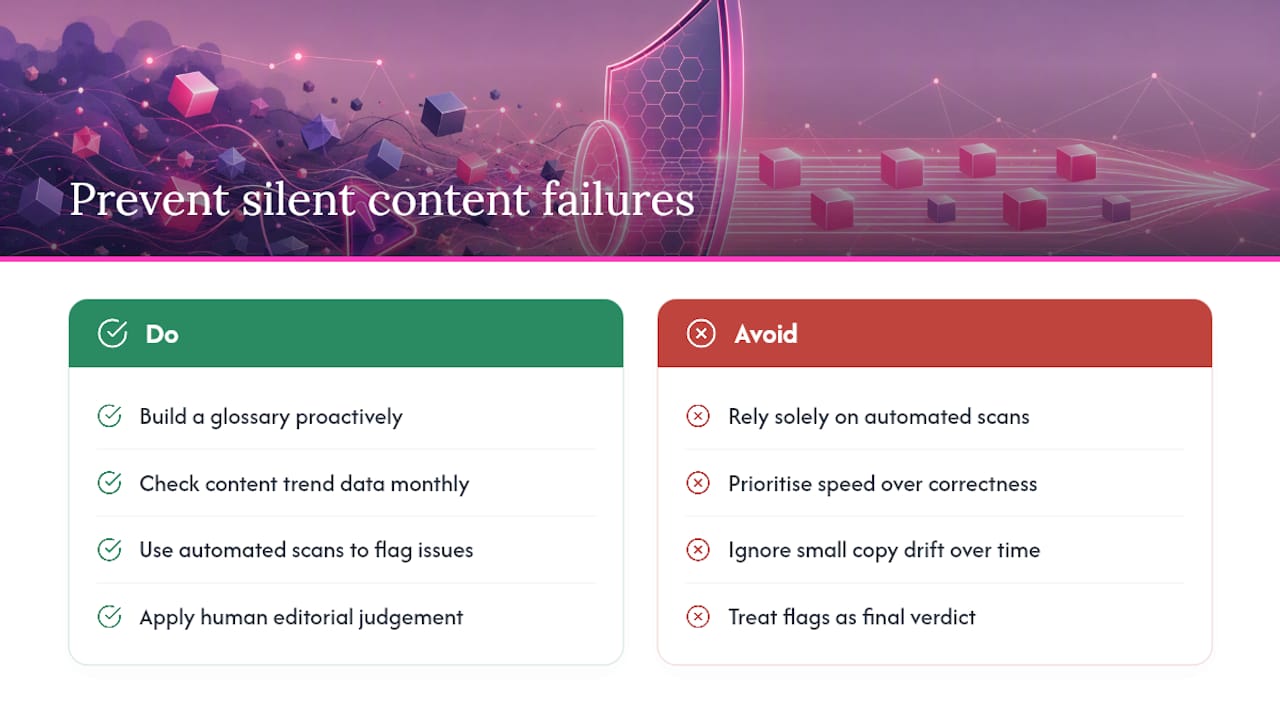
The uncomfortable nuance worth stating plainly: automated scanning is not a substitute for editorial judgement, and it was never meant to be. It’s a way of making sure the judgement you’ve already applied doesn’t silently erode after publication, when nobody’s rereading the page. Treat flags as a starting point for a human decision, not a verdict, and the false-positive frustration mostly disappears because you stop expecting the tool to be infallible.
The teams getting this right aren’t the ones running the most sophisticated scans. They’re the ones who built a glossary before they needed one, and who check their trend data monthly instead of only reacting when someone else spots the mistake first.
— Website
Run your first scan and see what’s actually live on your site
Most teams discover their real error count the moment they run a first scan, and it’s usually higher than expected, not because the writing is bad, but because nobody’s been checking systematically since launch. A single scan with Website SpellChecker produces a full error list, severity ratings, a change timeline showing what’s new since your last check, and a downloadable, shareable report you can hand straight to a client or a colleague.

There’s no subscription lock-in here: you pay per page scanned, with a free tier to test the output before committing budget. That makes a pilot genuinely low-risk, scan your homepage and top three landing pages first, see what surfaces, and decide from there whether to expand. Developers and agencies managing multiple client sites can integrate scanning directly through the WSSC-Bot crawler and API, fitting checks into an existing deployment pipeline rather than running them manually. If you’re weighing up the business case, the business owner-focused overview walks through what a typical first report looks like and how teams use it to prioritise fixes.
Sources
For deeper technical and governance context, consult Ahrefs on content decay, TeamBench’s research on AI quality gates, and NEURONwriter’s governance framework. For search-visibility context, see EE Partner Group’s checklist on AI search and expertise. Internally, the content audit tool alternatives guide and practical agency implementation guide cover setup in more depth.