Multilingual grammar checker for UK business websites

For UK businesses managing multilingual websites, the right approach is a website-wide crawler with dialect support, bulk URL scanning, and audit logging — not a copy-paste text tool. Run a free site scan on your highest-traffic pages today, then work through this checklist:
- Run a free site scan on your top 20 pages to establish a baseline error count.
- Prioritise conversion and product pages for immediate human review.
- Enable audit logging so every fix is tracked and demonstrable to stakeholders.
- Validate hreflang tags alongside grammar checks to avoid serving the wrong language version to search engines.
- Set up scheduled rescans so errors introduced by content updates are caught automatically.
A grammar checker for multiple languages that only accepts pasted text cannot scale to a site with hundreds of pages. You need a crawler that respects your sitemap, identifies language per URL, and returns per-page results in a downloadable report. Websitespellchecker is built precisely for that workflow, and it supports UK English as a distinct dialect.
Table of Contents
- What must a professional multilingual grammar checker do?
- How does website-wide multilingual scanning actually work?
- What technical i18n checks must accompany your grammar QA?
- How do you choose and integrate a multilingual grammar tool?
- What does a practical rollout look like for multilingual QA?
- Key takeaways
- Why a website-wide approach is the only one worth taking
- Websitespellchecker: built for UK businesses running multilingual sites
- Useful sources for multilingual QA and i18n validation
What must a professional multilingual grammar checker do?
A capable tool for website-wide language QA needs to do considerably more than flag a misplaced comma. Here is what to look for:
- Crawler and sitemap scanning. The tool must crawl your site via sitemap or direct URL list, not require manual text input. Bulk scanning across hundreds of URLs is the baseline requirement for any serious website QA workflow.
- Multi-language and dialect support. Look for coverage of UK English specifically, not just generic English. Regional and dialect distinctions matter: “colour”, “organise”, and “licence” are correct in British English and wrong flags in a US-only checker.
- Custom dictionaries and style guides. Your brand terms, product names, and house-style preferences should be whitelisted so the tool does not flag them as errors.
- CMS connectors, API access, and webhooks. Integration with WordPress, Drupal, or your headless CMS means scans fit into your publishing workflow rather than sitting outside it.
- Role-based access and audit logs. Content owners, localisation leads, and developers need different permissions. Audit logs let you demonstrate to clients or internal stakeholders exactly what was fixed and when.
- Downloadable PDF reports. Shareable, formatted exports are non-negotiable for agency workflows and client sign-off.
- Multi-model or hybrid AI checks. Tools that cross-check corrections across multiple AI models reduce false positives, which matters enormously on high-stakes pages.
Pro Tip: Ask any vendor for a sample report before you commit. A well-structured report shows per-URL issue lists, severity tags, and suggested fixes in context — if the sample is vague or flat, the live output will be too.
How does website-wide multilingual scanning actually work?
The scanning process has five distinct stages, and understanding each one helps you set realistic expectations for your team.
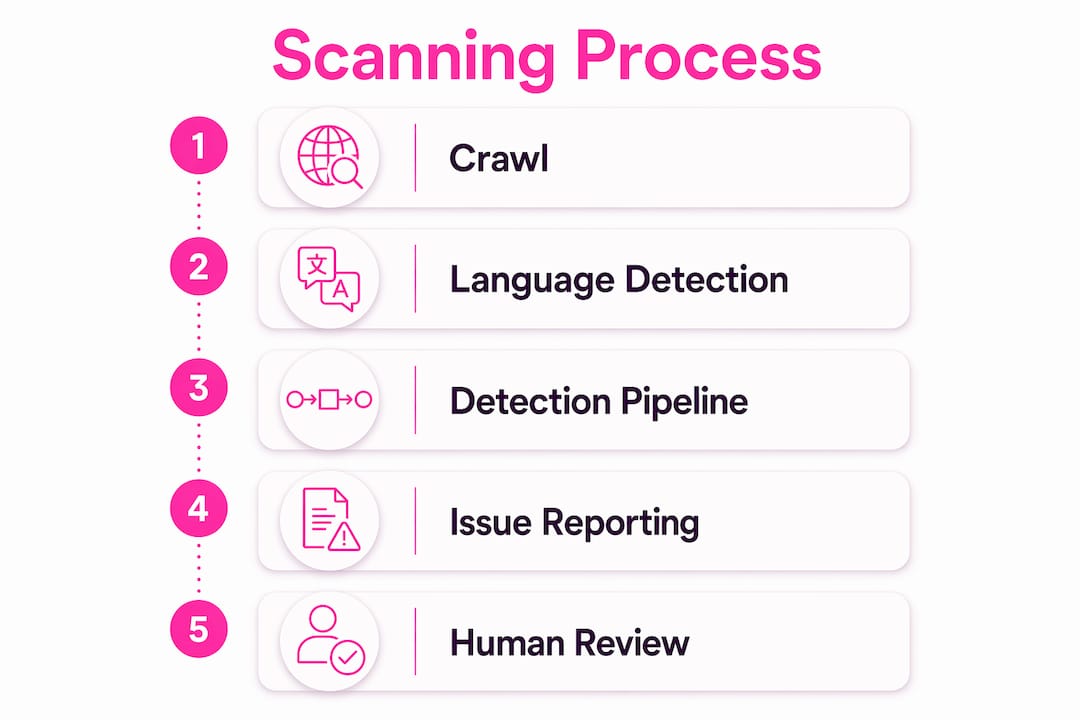
Crawl. The scanner reads your sitemap or a supplied URL list, then visits each page using a documented bot. Websitespellchecker uses WSSC-Bot, which is identifiable in server logs and respects robots.txt directives. Authenticated scans of password-protected staging environments are also supported, so you can check content before it goes live.

Language detection. Each page’s language is identified automatically, including locale variants. A French-language page and a UK English page on the same domain are processed through separate rule sets.
Detection pipeline. Rule-based checks catch clear grammatical errors, while AI models handle context-dependent issues: awkward phrasing, missing words, inconsistent usage, and formatting problems. Hybrid rule-plus-AI approaches reduce false positives and increase trustworthiness for high-stakes content.
Report generation. Results are returned as per-URL issue lists with severity tags (critical, moderate, minor), suggested fixes, and the surrounding text snippet for context. Reports are exportable as PDFs and stored in scan history so you can compare results over time.
Fix and rescan. Your team applies fixes, then triggers a rescan of affected URLs to confirm resolution. The scan history becomes your audit trail.
Scan everything, but route high-impact pages to human reviewers first. Automated detection catches the volume; human post-edit catches the nuance on pages where a single awkward sentence can cost a conversion.
Pro Tip: For large multilingual sites, prioritise high-traffic and conversion pages for human review in the first pass. Let the automated scan cover the long tail.
What technical i18n checks must accompany your grammar QA?
Grammar errors are only one way a multilingual site can fail its audience. Technical internationalisation failures can prevent search engines from serving the correct language version entirely, making your perfectly proofread French content invisible to French-speaking users.
Run these checks alongside every grammar scan:
- hreflang tag validation. Each language version of a page must carry a correctly formatted hreflang tag pointing to every other variant, including an
x-default. Missing or malformed tags mean Google cannot reliably match the right version to the right audience. - Content-Language headers. Your server should return a
Content-LanguageHTTP header that matches the language of the page being served. The W3C Internationalisation Checker validates this alongside character encoding and language attributes. - Locale-specific URL structures. Subdirectories (
/fr/,/de/) or subdomains (fr.example.com) give each language version a distinct, crawlable address. A single URL serving different languages dynamically based on browser locale creates indexing and caching problems that grammar QA cannot fix. - Canonicalisation. Each language version should self-reference its own canonical URL. Cross-language canonical tags consolidate pages incorrectly and suppress non-English versions in search results.
- Redirect rules. Locale-based redirects must send users to the correct version without creating redirect chains that slow page load.
| Technical check | Tool to use | What failure looks like |
|---|---|---|
| hreflang validation | W3C i18n Checker, locale-adaptive tester | Wrong language served in search results |
| Content-Language header | Browser dev tools, W3C checker | Search engine language mismatch |
| Canonical tags | Screaming Frog, site audit tools | Non-English pages suppressed in SERPs |
| Redirect rules | Server logs, redirect checker | Redirect loops or wrong-locale delivery |
| Sitemap language annotations | XML sitemap validator | Language versions missing from index |
A note on GDPR and data handling. If your site processes personal data and your scans touch pages containing that data, confirm that your scanning tool’s data-processing terms comply with UK GDPR. Websitespellchecker does not store your page content beyond the scan session, which is the standard you should expect from any vendor handling UK customer data.
How do you choose and integrate a multilingual grammar tool?
Procurement teams should work through a short set of questions before signing anything.
- Does it crawl sitemaps and authenticated areas? A tool that requires manual URL input is not viable for sites above 50 pages.
- Which dialects are supported? Confirm UK English is a named, distinct option — not just “English”.
- Can it export PDFs and preserve context snippets? Reports without surrounding text make triage slow and error-prone.
- What are the accuracy signals? Ask whether the tool uses multi-model consensus or a single AI engine, and whether custom-trained models are available for specialist vocabulary.
- What enterprise features are included? Look for SLA commitments, bulk credits, role-based permissions, and named support contacts.
- Is it GDPR-compliant for UK customers? Request the data-processing agreement before you scan any live customer-facing content.
On pricing, pay-per-page models suit agencies and businesses with variable scan volumes because you pay for what you use with no monthly commitment. Subscription tiers suit teams running weekly rescans across large sites. Factor in the cost of human post-editing for critical pages: automated scanning reduces the volume of manual review, but it rarely eliminates it entirely for high-conversion content. Reviewing website spell checker alternatives and content audit tool options can help you map the trade-offs before committing.
For integration, check whether the vendor offers:
- CMS plugins or native connectors for your platform
- A REST API or webhook for triggering scans from your CI/CD pipeline
- Scheduled scan configuration so rescans run automatically after publishing cycles
- User provisioning and onboarding support for distributed teams
A tool roundup for procurement teams can help you compare feature sets before you shortlist vendors.
What does a practical rollout look like for multilingual QA?
A staged rollout reduces risk and builds internal confidence in the process.
- Pilot scan (week 1–2). Scan your top 20 pages across all active languages. Review results with the content owner and localisation lead. Agree on severity thresholds: what counts as critical versus minor.
- Triage and fix (week 2–3). Content owners address critical errors. Developers fix any technical i18n issues surfaced alongside grammar problems. QA signs off on corrected pages.
- Rescan and verify (week 3–4). Run a targeted rescan of fixed URLs. Confirm the audit log reflects all changes. Share the before-and-after report with stakeholders.
- Staged rollout (weeks 4–8). Extend scanning to the full site in batches: product pages, support content, blog, then secondary language versions. Assign a localisation lead for each language.
- Ongoing cadence. Schedule weekly or fortnightly rescans. Route new errors to the relevant content owner automatically via webhook or email notification.
| Role | Responsibility | Hand-off point |
|---|---|---|
| Content owner | Reviews and fixes copy errors | Passes corrected pages to QA |
| Localisation lead | Reviews dialect and regional accuracy | Signs off language-specific pages |
| Developer | Fixes technical i18n issues | Confirms hreflang and header corrections |
| QA / site manager | Runs scans, manages audit log, reports to stakeholders | Closes issues in tracking system |
Audit logs are your proof of work. Every scan result, fix, and rescan should be stored so you can demonstrate improvement over time and respond to any client or compliance query with a dated record.
Key takeaways
A website-wide multilingual grammar checker must combine crawler-based scanning, dialect-specific rules, technical i18n validation, and audit logging to deliver reliable results for UK businesses.
| Point | Details |
|---|---|
| Crawl, don’t paste | Only a sitemap or URL-list crawler scales to real websites; manual text input is not viable above 50 pages. |
| Dialect support matters | Confirm UK English is a named dialect option, not just generic English, before committing to any tool. |
| Grammar QA needs i18n checks | hreflang, Content-Language headers, and canonical tags must be validated alongside linguistic errors. |
| Staged rollout reduces risk | A 1–2 week pilot on top pages, followed by a 4–8 week full rollout, builds confidence and surfaces issues early. |
| Websitespellchecker fits the brief | It crawls via sitemap, supports UK English, stores scan history, and exports PDF reports for client sign-off. |
Why a website-wide approach is the only one worth taking
The conventional wisdom treats grammar checking as a writing tool: paste your text, get corrections, move on. For a single blog post, that works. For a multilingual website with hundreds of pages updated by multiple contributors across different time zones, it is completely inadequate.
What actually matters is whether errors are caught before users see them, not after. A page with a misspelled product name or a grammatically broken French headline does not just look unprofessional. It chips away at trust in ways that are hard to recover from, particularly in markets where your brand is not yet established. Automated site-wide scanning catches the errors that manual review misses because it is exhaustive by design.
The other thing people underestimate is the audit trail. Knowing that a page had three critical errors in January and zero in March is not just reassuring. It is the kind of evidence that justifies the QA budget, satisfies compliance queries, and gives content teams a clear measure of progress. Sample reports and downloadable exports are not a nice extra. They are how you demonstrate that the work was done.
Websitespellchecker: built for UK businesses running multilingual sites
Where most grammar tools ask you to paste text, Websitespellchecker asks for your URL. That difference is the whole point. The AI-powered scanner crawls your entire site via sitemap or URL list, detects the language of each page automatically, and returns per-URL results with severity tags, suggested fixes, and context snippets — all in a shareable PDF report.

For UK businesses specifically, Websitespellchecker supports British English as a distinct dialect, so “colour” and “organise” are never flagged as errors. Custom dictionaries let you whitelist brand terms and product names. Scan history and audit logs give you a dated record of every issue found and fixed. There are no monthly subscriptions: you buy page credits and use them when you need them, which suits agencies managing multiple client sites as much as in-house teams running quarterly audits.
See what your site’s spell check report looks like before you commit, or go straight to the business owner page to run your first free scan today.
Useful sources for multilingual QA and i18n validation
- W3C Internationalisation Checker — validates Content-Language headers, character encoding, and language attributes. Run this on every language version of your key pages.
- Localization Validator (Perfect Metadata) — checks hreflang implementation and locale signals. Useful for confirming that search engines can match the correct language version to the right audience.
- Website QA Checklist: 35+ checks before you launch — a practical pre-launch checklist covering deployment and content issues alongside grammar QA. Good reference for teams building their own QA process.
- Websitespellchecker sample report — review a real export to understand what per-URL results, severity tags, and audit logs look like in practice before evaluating any tool.
- UK GDPR guidance (ICO) — the Information Commissioner’s Office is the primary reference for data-handling obligations when scanning pages that may contain personal data. Confirm your scanning tool’s data-processing terms against this guidance.